(01)

Hover edge light

A soft spotlight follows the pointer across each card while its 1px border lights up nearest the cursor — the effect behind this site’s project cards.

  • CSS masks
  • Custom properties
  • Pointer events
A::before

Spotlight fill

A large radial gradient, centred on the pointer, washes the card in accent.

B::after

Edge light

The same gradient, masked down to a 1px ring so only the border glows.

CJavaScript

One listener

pointermove writes --mx and --my. CSS does everything else.

  • Cursor position lives in two custom properties per card — no re-rendering and no layout work.
  • The ring is two mask layers (content-box and border-box) composited with exclude.
  • Skipped on touch devices, where there’s no hover to follow.
(02)

Split reveal

Two versions of one composition are stacked; the top one is clipped to the pointer’s x position, so a single vertical edge follows you across. It powers the footer wordmark on every page.

  • clip-path
  • Pointer events
  • Touch friendly

Details make it work.

  • clip-path: inset() on the top layer — cheaper than resizing it, and the text never reflows.
  • The pointer’s x becomes one custom property; a short transition smooths the edge.
  • After Hyperplexed’s Super Header Slider on CodePen.
(03)

Flip clock

A split-flap display: every digit is four halves, and one leaf turns on its hinge to uncover the next number. Your local time, flipping every second.

  • 3D transforms
  • Keyframes
  • No libraries
  • Each change swaps text in four halves and replays a single CSS keyframe — no canvas, no dependencies.
  • Ticks are scheduled on the real second boundary, so digits flip in step with the system clock.
  • Inspired by FlipClock.js; with reduced motion, digits simply change.
(04)

Clock of clocks

144 analog clocks, two hands each, choreographed into digits. Hands always turn forward to their next pose, so the whole wall ripples like a kinetic sculpture.

  • CSS transitions
  • Container queries
  • Vanilla JS
  • Each digit is a 4×6 grid; seven hand poses — corners, lines and a resting diagonal — spell 0–9.
  • Angles accumulate forwards (prev + ((next − prev) mod 360)), so no hand ever spins back.
  • Ported from a React CodePen study to vanilla JS, sized with container query units to fit any width.
(05)

Mouse trailer

Something that follows the cursor, four ways: a classic dot that swells to show what a click will do, an echo of fading circles, a glowing comet tail, or ripples that bloom as you move.

  • Web Animations API
  • Canvas
  • Pointer events
  • Every pointer move starts an 800ms Web Animations API transition from wherever the dot is now — that restart is the elastic lag, with no animation loop.
  • Echo chains ten circles, each easing toward the one ahead; comet keeps the last half-second of positions and redraws a tapering, fading path on a canvas.
  • Ripples spawn every few dozen pixels and animate themselves away. After Hyperplexed’s tutorial, inspired by monopo.vn. Off on touch screens.
(06)

Cursive signature

A name written stroke by stroke at a steady pen speed, in your choice of two single-stroke cursives — loose and handwritten, or clean and digital — with an optional ink nib on the tip.

  • SVG paths
  • stroke-dashoffset
  • Single-line font
Handwritten · EMS Allure
  • Handwritten uses EMS Allure, a single-stroke take on Allura (SIL Open Font License); digital uses Hershey Script, a classic vector font. Both are real pen paths, not outlines.
  • A small generator smooths each stroke into Bézier curves; pathLength="1" lets one dash offset draw any stroke from 0 to 1.
  • getPointAtLength() places the nib, and strokes that begin where the last one ended flow on without a pen-lift pause.
(07)

Liquid glass lens

Drag a lens of glass across the page. It magnifies what’s beneath, bends it at the rim and splits the colour at the edge, like light through a real lens.

  • SVG filters
  • feDisplacementMap
  • Canvas

Look closer

See every detail.

Refraction, magnification and a chromatic edge, all from a single SVG filter.
  • The lens holds a second copy of the scene, scaled around the lens centre, so it magnifies whatever sits beneath.
  • A canvas paints a displacement map whose pull grows towards the rim; feDisplacementMap uses it to bend the copy like curved glass.
  • The chromatic edge displaces red, green and blue by different amounts, then screens them back together.
(08)

Particle portrait

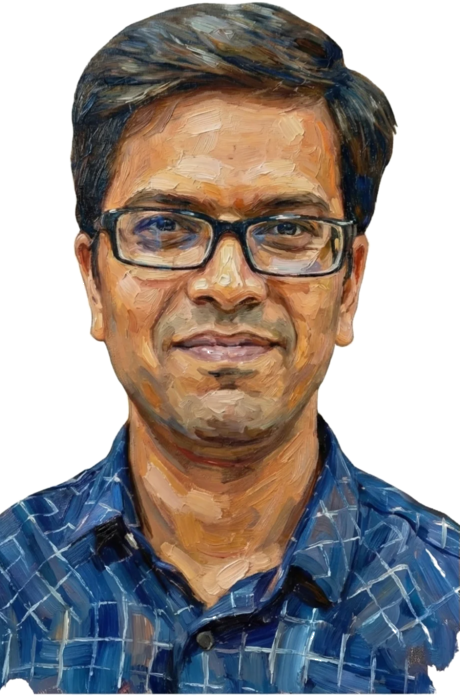
My portrait as thousands of coloured particles. They scatter away from the cursor and settle back into place, and can re-form as the monogram or burst apart entirely.

  • Canvas 2D
  • Spring physics
  • Typed arrays
  • The image is read once with getImageData; every opaque sample becomes a particle that remembers its home and colour.
  • Each frame, a spring pulls particles home while the pointer pushes them away; positions live in typed arrays for speed.
  • Shapes just swap the home positions, so the same particles fly into the monogram. The loop sleeps once everything settles.
(09)

Text scramble

Text that decodes itself. Every character churns through random glyphs and locks in at its own moment, so each phrase resolves like an intercepted signal.

  • requestAnimationFrame
  • Staggered timing
  • aria-live

Software Architect

  • Each character gets a random start and end frame; between them it shows a fresh random glyph, occasionally re-rolled.
  • Settled characters are plain text and churning ones are tinted spans, rebuilt each frame from a small queue.
  • The visual line is hidden from screen readers; a polite live region announces only the finished phrase.
(10)

Magnetic grid

Hundreds of small needles, all turning to face the cursor like iron filings around a magnet. Click and a ripple rolls outward through the field.

  • Canvas 2D
  • Path2D batching
  • Angle easing
  • Every needle eases towards the cursor along the shortest arc, so turning stays smooth even when the cursor jumps.
  • Needles are grouped by brightness into a few Path2D batches, keeping it to a handful of draw calls per frame.
  • Ripples are rings expanding over time; each needle measures its distance to the ring to lengthen and glow as it passes.
(11)

Live SQL visualizer

Write a fluent query-builder chain and watch it run. It compiles to parameterised SQL, then each clause plays out on the table: rows join, fail the filter, sort and get trimmed.

  • Parser
  • Query planning
  • FLIP animation
Query builder · PHP Ctrl/⌘ + Enter to run
Compiled SQL Bindings []


    • A small parser reads the method chain, checks tables, columns and operators, and reports friendly errors as you type.
    • The planner runs each clause on in-memory tables and records what changed, so every step can be animated on its own.
    • Rows glide into their new order with FLIP, and where values become ? placeholders with separate bindings, just like the real Query Builder.
    (13)

    Scroll storytelling

    Scroll to push one order through an ERP, from purchase to a reconciled ledger. The panel stays put while every number, stage and event advances with your scroll.

    • position: sticky
    • Scroll progress
    • ERP domain
    Order UV-2041 Sample data

    Stage 1 of 5 · Purchase Purchase order raised

    Stage 2 of 5 · Inventory Received and stored

    Stage 3 of 5 · Production Pressed into panels

    Stage 4 of 5 · Sales Dispatched and invoiced

    Stage 5 of 5 · Finance Paid and reconciled

    Sheets ordered 0 PO-2041 · Teak veneer 0.6 mm
    In stock 0 Bin R-14 · QC passed
    Panels pressed 0 Batch B-07 · 2 sheets per panel
    Invoice value 0 INV-5528 · 120 panels dispatched
    Payment received 0 Ledger balanced · order closed
    1. PO-2041 raised
    2. Supplier confirmed
    3. 240 sheets received
    4. Quality check passed
    5. Batch B-07 started
    6. 120 panels finished
    7. Panels dispatched
    8. Invoice INV-5528 sent
    9. Payment received
    10. Ledger reconciled
    • A tall track holds a position: sticky panel; scroll progress through the track becomes one number from 0 to 1.
    • That number picks the stage, counts each metric up with easing, slides the order along the pipeline and reveals events as it passes them.
    • Click any stage to jump there. The flow mirrors the order-to-cash ERP I built for a manufacturer; the figures here are illustrative.
    (14)

    3D tilt cards

    Cards that lean towards the pointer like physical objects. Their contents float at different depths, a highlight sweeps across the surface and the shadow shifts the other way.

    • preserve-3d
    • translateZ
    • Eased pointer tracking
    Featured suite Media Hub Upload, capture and preview any file, in one suite. MediaRecorder Canvas
    Security Password Manager AES-256 vaults, passkeys and granular team sharing. WebAuthn AES-256
    Productivity Timekeeper Live timers, calendar, reports and push reminders. Service Workers FCM
    • Each card uses transform-style: preserve-3d; the emblem, text and tags sit at different translateZ depths, so they shift against each other as it tilts.
    • Pointer position sets a target angle, and each frame eases towards it, so the motion feels weighted rather than twitchy.
    • The glare is a radial highlight that follows the pointer with an overlay blend. Keyboard focus tilts a card too, and reduced motion keeps cards flat.
    (15)

    Gooey blobs

    Shapes that melt into one another like liquid. Drift through a field of blobs, or open a menu whose buttons ooze out of it. Switch the filter off to see the plain circles underneath.

    • SVG filters
    • feColorMatrix
    • Accessible menu
    Blob field
    Gooey menu
    • A Gaussian blur smears the shapes into each other, then feColorMatrix boosts alpha contrast so the soft edges snap back into a crisp, liquid outline.
    • Icons and links sit in an unfiltered layer on top that moves in step with the blobs, so they stay sharp and remain real, focusable links.
    • Blobs drift on Lissajous paths and one eases after the pointer; the loop pauses off-screen, and reduced motion keeps everything still.
    (16)

    Infinite canvas

    A map of my work you can explore like a design tool: drag to pan, zoom in on any corner and jump around with the minimap. Career and skills are drawn straight from my résumé data.

    • Transforms
    • Pinch & wheel zoom
    • Inertia
    Hitesh Vaghela Software architect & builder
    Projects
    Suite Media Hub Upload, capture and preview
    Security Password Manager AES-256 · passkeys · sharing
    Productivity Timekeeper Timers, reports, push reminders
    Enterprise ERP System Order-to-cash for a manufacturer
    Library Query Builder Fluent, parameterised SQL
    Career
    Lab
    Demo 11 Live SQL visualizer Query builder, animated
    Demo 08 Particle portrait Thousands of springs
    Demo 07 Liquid glass lens SVG refraction
    Skills
    2025–Present Team Lead Accrete Globus Technology
    2019–2025 Full-Stack Developer Uro Veneer World
    2015–2019 Freelance Full-Stack Developer Self-employed
    2010–2015 Lecturer Dr. Jivraj Mehta Institute of Technology
    Languages PHP, JavaScript + 4 more
    Backend Node.js, Express + 4 more
    Frontend React, SASS + 3 more
    Data MySQL, MongoDB + 1 more
    Infra AWS, Docker + 4 more
    100%
    • The whole board is one layer moved with translate and scale; zooming solves for the offset that keeps the point under your cursor still.
    • Drags keep their momentum and glide to a stop; two-finger pinches zoom around the midpoint. The dotted grid pans and scales in step.
    • On touch screens the board waits for a tap before capturing gestures, so it never traps page scrolling.
    navigate select hiteshvaghela.com